Overview
What is the feature?
ScriptSure allow providers to use a Prescriber Address instead of a practice address when sending controlled prescriptions. This feature is for providers who need to prescribed controlled substances using an address other than their practice address.
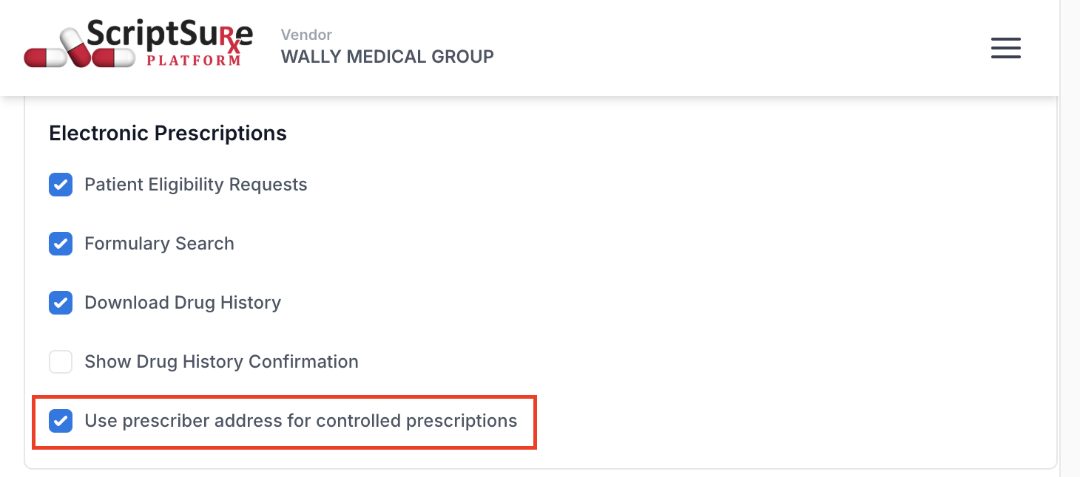
Admins can choose which practices use the provider’s Prescriber Address for controlled prescriptions by enabling the “Use prescriber address for controlled prescriptions” setting. When enabled, ScriptSure automatically uses the appropriate address based on the practice settings and the provider’s credentials.
Who is the feature for?
Prescriber Address may be useful for:
- Telehealth providers who need to prescribe controlled substances using their own registered address.
- Organizations operating across multiple states that want to consolidate telehealth practices when providers can use the same prescribing credentials.
Setup Instructions
Step 1: Enable Prescriber Address for a Practice
- Select the practice whose settings you want to edit and open practice settings.
- In the Electronic Prescriptions section, check Use prescriber address for controlled prescriptions.
Step 2: Add a Prescriber Address
- Open the provider’s user profile and select Edit.
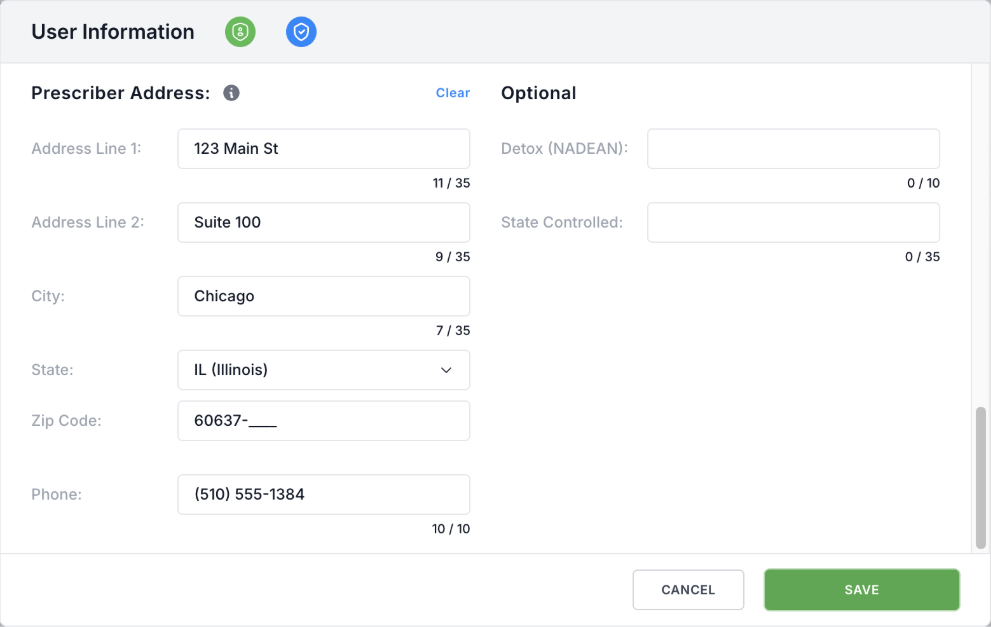
- In the Prescriber Address section, enter the address the provider will use for controlled substance prescribing. Note, a phone number is also required when a Prescriber Address is provided.
- Save & confirm your changes
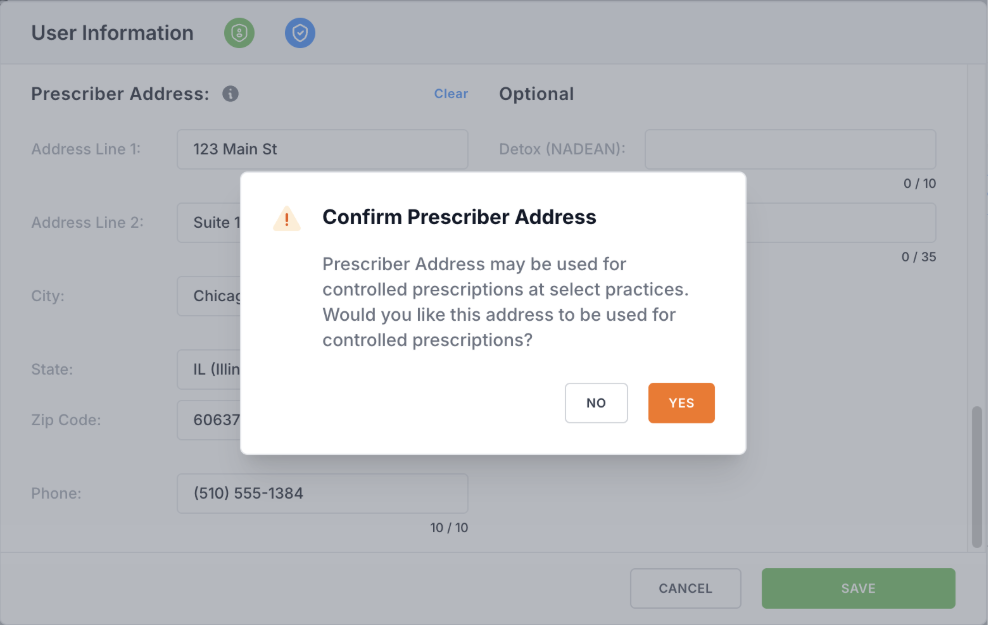
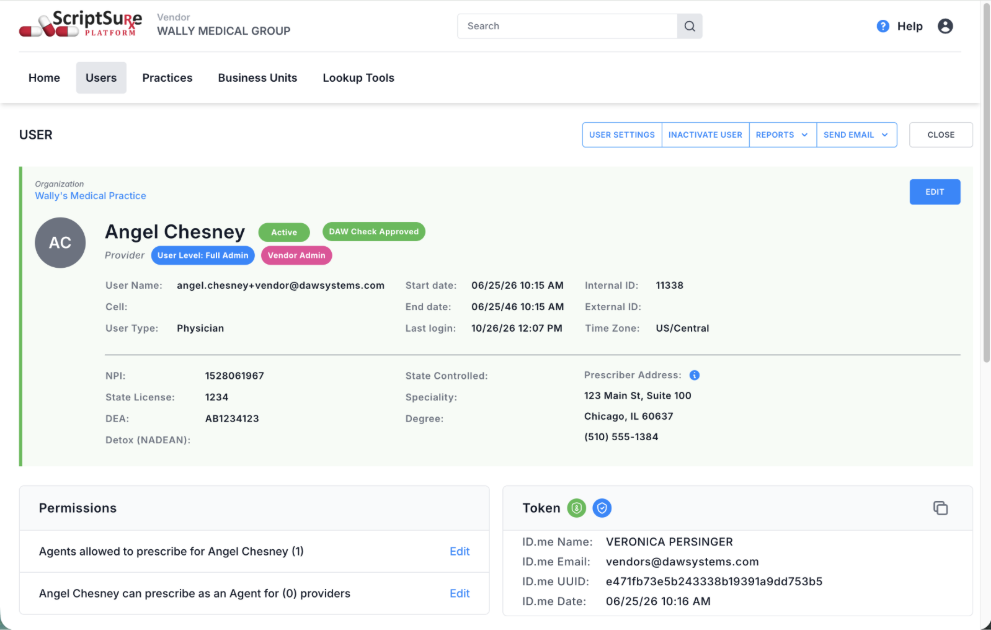

Once saved, the prescriber address will automatically register for the NewRx and ControlledRx service levels and send an EPCS approval request. EPCS approval must be completed by an authorized user in the same business unit as the provider before the provider may prescribe controlled substances using their Prescriber Address.
Once setup is complete, ScriptSure automatically uses the Prescriber Address when the practice is configured to use it and the provider has the required authorization.
Step 3: Updating or Removing a Prescriber Address
- Open the provider’s user profile and select Edit.
- Update the information in the Prescriber Address section.
- Save & confirm your changes.
Changing a Prescriber Address requires the address to be re-registered with Surescripts. Existing EPCS approval is retained. Removing the Prescriber Address will also remove its Surescripts registration and associated service levels.
Frequently Asked Questions
- How does ScriptSure determine which address to use?
ScriptSure determines which address to use when a prescription is sent.
Scenario | Address used |
Non-controlled prescription | Practice Address |
Controlled prescription with Prescriber Address disabled for the practice | Practice Address |
Controlled prescription with a qualifying practice-level Override Identification | Practice Address |
Controlled prescription with Prescriber Address enabled & Provider has required authorization | Prescriber Address |
Provider does not have a Prescriber Address configured | Practice Address |
If ScriptSure determines that Prescriber Address should be used, but the provider does not have the required ControlledRx service level or EPCS approval, the provider cannot send controlled prescriptions until the required authorization is completed. Note, if the provider does not have Prescriber Address configured, ScriptSure will always use the Practice Address and related authorization.
- Does Prescriber Address apply to all prescriptions?
No. Prescriber Address is only used for controlled substance prescriptions. Non-controlled prescriptions always use the practice address.
If a provider has practice-level Override Identification that includes the ControlledRx service-level, the practice address and the override identification will be used even if the provider has a Prescriber Address.
- Can a provider use the same Prescriber Address at multiple practices?
Yes. A provider can use their Prescriber Address at multiple practices, provided each practice is configured to use it.
- Does enabling Prescriber Address automatically authorized controlled prescribing?
No. The provider must still have the ControlledRx service level and EPCS approval associated with their Prescriber Address.
- Can I disable Prescriber Address without removing it from the provider’s profile?
Yes. “Use prescriber address for controlled prescriptions” can be disabled for a particular practice. The provider’s Prescriber Address will remain saved on their profile for use at other practices where the setting is enabled.
Was this article helpful?
That’s Great!
Thank you for your feedback
Sorry! We couldn't be helpful
Thank you for your feedback
Feedback sent
We appreciate your effort and will try to fix the article